
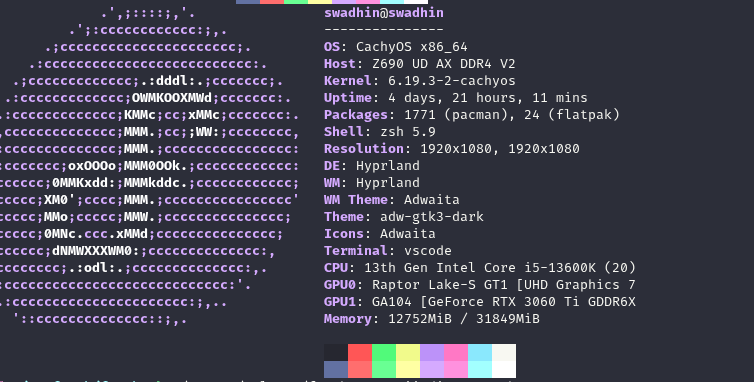
ASCII Art Mode
Classic distro logo with system info
|

Kitty Image Backend
Auto-fetched image via smart caching
|

Random Image Every Run
Background download, zero delay
|

Smart Image Caching
Previous image shown instantly
|

Custom Image
Use your own wallpaper or photo
|
Nerd Fonts + Progress Bars
Memory & disk usage bars with icons
|
---
## Table of Contents
- [Gallery](#gallery)
- [Features](#features)
- [Installation](#installation)
- [Quick Install (Recommended)](#quick-install-recommended)
- [From Source (Manual)](#from-source-manual)
- [With Make](#with-make)
- [From Cargo](#from-cargo)
- [Arch Linux / CachyOS / Manjaro (AUR)](#arch-linux--cachyos--manjaro-aur)
- [Shell Aliases (Replace neofetch)](#shell-aliases-replace-neofetch)
- [Configuration](#configuration)
- [Getting Started](#getting-started)
- [Config File Location](#config-file-location)
- [Full Configuration Reference](#full-configuration-reference)
- [Example Configs](#example-configs)
- [Usage](#usage)
- [Image Backends](#image-backends)
- [How Smart Image Fetching Works](#how-smart-image-fetching-works)
- [Advanced Features](#advanced-features)
- [Information Displayed](#information-displayed)
- [Supported Distributions](#supported-distributions)
- [Comparison with Neofetch](#comparison-with-neofetch)
- [Dependencies](#dependencies)
- [Uninstalling](#uninstalling)
- [Contributing](#contributing)
- [Star History](#star-history)
- [License](#license)
---
## Features
> **Why FetchX over neofetch?** Neofetch is [no longer maintained](https://github.com/dylanaraps/neofetch/issues/2691). FetchX is a modern, actively developed replacement written in Rust — 10x faster, with image support and smart caching built in.
- **Blazing Fast** — Parallel info detection across 8 threads, finishes in ~10-50ms (vs neofetch's ~200-500ms)
- **Tiny Binary** — ~1.8 MB stripped, LTO-optimized — no Python, no Bash, no runtime deps
- **TOML Config** — Clean `~/.config/fetchx/config.toml` with 35+ options (no scripting needed)
- **5 Image Backends** — Kitty graphics protocol, Sixel, Chafa, w3m, iTerm2
- **Smart Image Caching** — Auto-downloads random images from API, shows instantly with zero delay, new image every run
- **60+ Distro Logos** — ASCII art with `{c1}`-`{c6}` color placeholders
- **Nerd Font Icons** — Optional icons for every info label (requires [Nerd Font](https://www.nerdfonts.com/))
- **Progress Bars** — Visual bars for memory and disk usage `[███████░░░░]`
- **Emoji Mode** — Fun emoji art alternative to ASCII logos
- **JSON Output** — Machine-readable `--json` flag for scripting & automation
- **Custom ASCII Art** — Load your own art from any text file
- **256-Color Support** — Full terminal color palette
- **Terminal-Width Aware** — Lines truncate cleanly, never wraps
- **Interactive Image Picker** — Browse & select images with fzf
- **Daemon Mode** — Background service for Waybar/Polybar/status bar integration
- **Drop-in neofetch replacement** — `alias neofetch='fetchx'` and you're done
---
## Installation
### Quick Install (Recommended)
One-liner that clones, builds, installs, and sets up aliases:
```bash
curl -fsSL https://raw.githubusercontent.com/swadhinbiswas/fetchx/main/install.sh | bash
```
Or with wget:
```bash
wget -qO- https://raw.githubusercontent.com/swadhinbiswas/fetchx/main/install.sh | bash
```
**Install script options:**
```bash
./install.sh # Install to ~/.local/bin (default)
./install.sh --system # Install to /usr/local/bin (requires sudo)
./install.sh --prefix=/opt # Custom prefix
./install.sh --no-alias # Skip shell alias setup
./install.sh --uninstall # Remove FetchX completely
```
### From Source (Manual)
**Prerequisites:** [Rust toolchain](https://rustup.rs/) (rustc + cargo)
```bash
# Install Rust (if not already installed)
curl --proto '=https' --tlsv1.2 -sSf https://sh.rustup.rs | sh
source ~/.cargo/env
# Clone and build
git clone https://github.com/swadhinbiswas/fetchx.git
cd fetchx/fetchx
# Build optimized release binary
cargo build --release
# Install to user directory (no sudo needed)
mkdir -p ~/.local/bin
install -m 755 target/release/fetchx ~/.local/bin/fetchx
# Make sure ~/.local/bin is in your PATH (see Shell Setup below)
```
**System-wide install (requires sudo):**
```bash
sudo install -m 755 target/release/fetchx /usr/local/bin/fetchx
```
### With Make
```bash
git clone https://github.com/swadhinbiswas/fetchx.git
cd fetchx/fetchx
make # Build
sudo make install # Install to /usr/local/bin
# or
make PREFIX=~/.local install # Install to ~/.local/bin
```
### From Cargo
```bash
cargo install --git https://github.com/swadhinbiswas/fetchx.git
```
### Arch Linux / CachyOS / Manjaro (AUR)
```bash
# If you have an AUR helper like yay or paru:
yay -S fetchx-git
# or
paru -S fetchx-git
```
---
## Shell Aliases (Replace neofetch)
Set up aliases so `fetch` or `neofetch` runs FetchX instead.
### Bash (`~/.bashrc`)
```bash
# Add to the end of ~/.bashrc
export PATH="$HOME/.local/bin:$PATH" # if installed to ~/.local/bin
# FetchX aliases
alias fetch='fetchx'
alias neofetch='fetchx'
```
Then reload:
```bash
source ~/.bashrc
```
### Zsh (`~/.zshrc`)
```bash
# Add to the end of ~/.zshrc
export PATH="$HOME/.local/bin:$PATH" # if installed to ~/.local/bin
# FetchX aliases
alias fetch='fetchx'
alias neofetch='fetchx'
```
Then reload:
```bash
source ~/.zshrc
```
### Fish (`~/.config/fish/config.fish`)
```fish
# Add to ~/.config/fish/config.fish
fish_add_path ~/.local/bin # if installed to ~/.local/bin
# FetchX aliases
alias fetch 'fetchx'
alias neofetch 'fetchx'
```
Then reload:
```fish
source ~/.config/fish/config.fish
```
### Nushell (`~/.config/nushell/config.nu`)
```nu
# Add to config.nu
alias fetch = fetchx
alias neofetch = fetchx
```
### PowerShell (WSL) (`$PROFILE`)
```powershell
Set-Alias -Name fetch -Value fetchx
Set-Alias -Name neofetch -Value fetchx
```
> **Tip:** The install script (`install.sh`) automatically sets up aliases for your current shell.
---
## Configuration
### Getting Started
Create the default config file:
```bash
fetchx --create-config
```
This creates `~/.config/fetchx/config.toml` with all options documented.
To view the config path:
```bash
fetchx --show-config
```
To print the full default config to stdout (useful for reference):
```bash
fetchx --print-config
```
### Config File Location
| OS | Path |
| ----- | -------------------------------------------------- |
| Linux | `~/.config/fetchx/config.toml` |
| macOS | `~/Library/Application Support/fetchx/config.toml` |
### Full Configuration Reference
The config file is TOML format. Every option has a sensible default — you only need to set what you want to change.
```toml
# =============================================================================
# FetchX Configuration — ~/.config/fetchx/config.toml
# =============================================================================
# ─── Display ─────────────────────────────────────────────────────────────────
no_color = false # Disable all colors (useful for piping)
bold = true # Enable bold text
separator = ": " # Separator between label and value (e.g., "OS: Arch")
# ─── Colors ──────────────────────────────────────────────────────────────────
# "distro" = automatically match your distro's colors (default)
# Or use an array of up to 6 color numbers:
# [title, @-symbol, underline, subtitle, colon, info-text]
#
# Color numbers: 0=black, 1=red, 2=green, 3=yellow, 4=blue,
# 5=magenta, 6=cyan, 7=white, 8-255=256-color palette
colors = "distro"
# colors = [4, 6, 1, 8, 8, 6] # Custom: blue title, cyan @, red underline
# ─── Image Backend ───────────────────────────────────────────────────────────
# Which rendering method to use for the logo/image area
#
# Values:
# "ascii" — Text-based ASCII art (works everywhere)
# "kitty" — Kitty graphics protocol (best quality, kitty terminal only)
# "sixel" — Sixel graphics (xterm, mlterm, foot — needs img2sixel)
# "chafa" — Unicode art via chafa (works in any terminal — needs chafa)
# "w3m" — w3m image display (X11 terminals — needs w3mimgdisplay)
# "iterm2" — iTerm2 inline images (macOS iTerm2 only)
# "off" — No logo/image at all
image_backend = "ascii"
# ─── Image Source ────────────────────────────────────────────────────────────
# Where to get the image when using a graphics backend (kitty/sixel/etc)
#
# Values:
# "auto" — Smart caching: downloads random images from API,
# shows previous image instantly, downloads new one
# in background for next run
# "ascii" — Force ASCII art even with graphics backend
# "wallpaper" — Use your current desktop wallpaper
# "/path/to/image.png" — Use a specific image file
image_source = "auto"
# ─── ASCII Art ───────────────────────────────────────────────────────────────
# Which distro's ASCII logo to show (when image_backend = "ascii")
# "auto" detects from /etc/os-release
# Or specify: "arch", "ubuntu", "debian", "fedora", "cachyos", "nixos",
# "manjaro", "void", "pop", "endeavouros", "gentoo", "kali",
# "opensuse", "linuxmint", "alpine", "garuda", "zorin",
# "elementary", "rocky", "alma", "slackware", "centos",
# "solus", "deepin", "mx", "raspbian", "freebsd", "openbsd",
# "macos", "windows", "android", and 30+ more!
ascii_distro = "auto"
# Path to custom ASCII art file (overrides ascii_distro)
# File can use {c1}..{c6} for color placeholders, one line per row
# ascii_file = "/home/user/.config/fetchx/my_logo.txt"
# Colors for ASCII art: "distro" or explicit array [4, 6, 1]
ascii_colors = "distro"
# Bold the ASCII art
ascii_bold = true
# ─── Custom Image ────────────────────────────────────────────────────────────
# Path to a specific image file (overrides image_source)
# custom_image = "/home/user/pictures/wallpaper.png"
# Image sizing
# image_size = "auto" # "auto", "none", "300px", "50%"
# crop_mode = "normal" # "normal", "fit", "fill"
# crop_offset = "center" # "center", "north", "south", "east", "west"
# ─── Info Fields ─────────────────────────────────────────────────────────────
# Toggle which info lines to show (true/false)
show_title = true # user@hostname
show_underline = true # ─────────────
show_os = true # OS: Arch Linux x86_64
show_host = true # Host: ThinkPad X1 Carbon
show_kernel = true # Kernel: 6.x.x-arch1-1
show_uptime = true # Uptime: 3 days, 5 hours
show_packages = true # Packages: 1200 (pacman), 15 (flatpak)
show_shell = true # Shell: zsh 5.9
show_resolution = true # Resolution: 1920x1080
show_de = true # DE: Hyprland
show_wm = true # WM: Hyprland
show_wm_theme = true # WM Theme: Adwaita
show_theme = true # Theme: adw-gtk3-dark
show_icons = true # Icons: Adwaita
show_terminal = true # Terminal: kitty
show_term_font = true # Terminal Font: JetBrains Mono
show_cpu = true # CPU: Intel i5-13600K (20) @ 5.10GHz
show_gpu = true # GPU: NVIDIA RTX 3060 Ti
show_memory = true # Memory: 8000MiB / 32000MiB
show_disk = false # Disk: 100G / 500G (20%)
show_battery = false # Battery: 85% [charging]
show_local_ip = false # Local IP: 192.168.1.100
show_public_ip = false # Public IP: 203.0.113.50
show_locale = false # Locale: en_US.UTF-8
show_song = false # Song: Artist - Title
show_users = false # Users: user1, user2
show_colors = true # Color blocks ████████
# ─── Extra Features ──────────────────────────────────────────────────────────
nerd_font = false # Use Nerd Font icons for labels (needs Nerd Font)
emoji_mode = false # Use emoji art instead of ASCII
memory_bar = false # Show memory progress bar [██████░░░░]
disk_bar = false # Show disk progress bar [██████░░░░]
bar_width = 15 # Width of progress bars (characters)
# ─── Layout ──────────────────────────────────────────────────────────────────
gap = 3 # Space between logo and info (characters)
logo_only = false # Only show logo, hide all info
# ─── Color Blocks ────────────────────────────────────────────────────────────
block_range = [0, 15] # Range of colors to display (0-15)
block_width = 3 # Width of each color block
block_height = 1 # Height of color block rows
# ─── Underline ───────────────────────────────────────────────────────────────
underline_char = "-" # Character used for title underline
# ─── Misc ────────────────────────────────────────────────────────────────────
stdout = false # Plain output mode (for piping to other commands)
```
### Example Configs




